Developer How-To Series
Create and Use Your own MCP Server
July, 2026
A new and very useful feature in 1.44 is the ability to turn your Vantiq project into a MCP Server and make it available anywhere.

A quick history lesson: What made Stanley hinges so much more popular in the late 19th century than its competition? Answer: They were the first company to include the installation screws.
What made the Model Context Protocol (MCP) open-source standard, introduced by Anthropic in late 2024, so popular so fast? That’s easy; just like the Stanley screws of yore, MCP makes it easy to connect things. In this case, those “things” are AI systems to the data sources and tools that use them.
If there’s an application that uses AI, there’s a MCP server to plug it into your favorite LLM. As the MCP website puts it: “Think of MCP like a USB-C port for AI applications.”
And now you can create MCP servers out of your Vantiq projects.
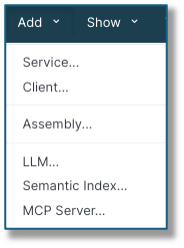
In the IDE, you’ll find the option in the Add menu. Choose Add -> MCP Server…:
And now we’ll move on to concrete examples so you can see what all the features are for.
Use Case #1: The Knowledge Base (KB) MCP Server
This server is available to all developers who want to ask more probing questions about the whys and wherefores to building Vantiq applications. To answer your questions, this server is instructed to search through its vast collection source documents to find the relevant material. Those instructions are in the kr/mcp-instructions.md file, and referenced in the Instructions Document setting for the server:
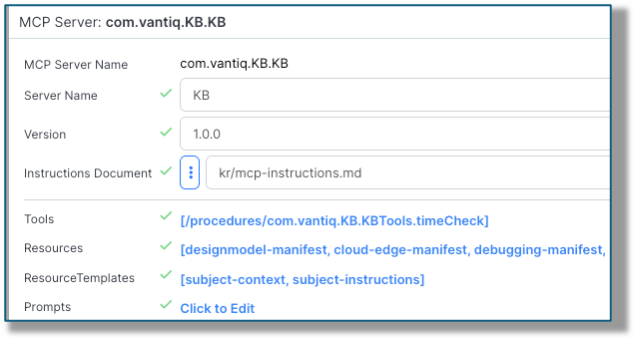
The file tells the AI what to do and how to do it.
Notice we’ve also supplied the MCP Server Name (that’s the name of the resource on the platform) and the Server Name (that’s its nickname, if you will). Fill in what makes sense for your server’s version – it’s handy to know the version in case someone need to update for the latest-greatest.)
For this server, the Tools and Prompts are not important, but the Resources and ResourceTemplates are, so let’s cover those first.
Resources: These are reference documents to aid the server in its mission. Here’s what the KB resources look like. Each has a Name field, the URL to the document, and a Title, along with a description:
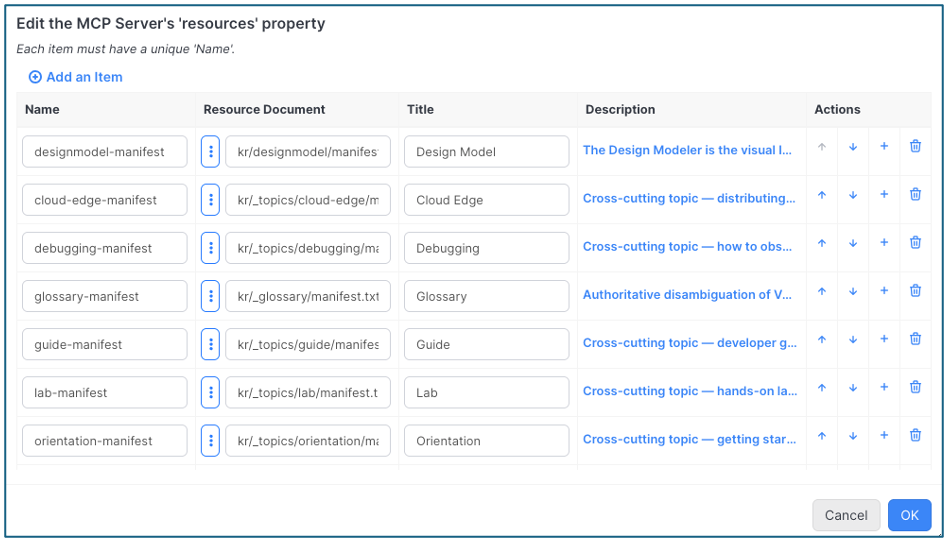
Notice we’re not supplying every document the server will search, but only the ones that cover a broad category and point to other docs with the specifics. (Of course, the instructions patiently explain what to do with them.)
ResourceTemplates: The source documents follow a consistent pattern, so why waste time with all the extra words? Here’s the template for “subject-context”: kr/{resource}/context/{+filename}
The values for resource and filename get filled in at run-time with the pertinent information, turning this dynamic URI into the exact location of the needed content.
Use Case #2: The CakeWalk MCP Server
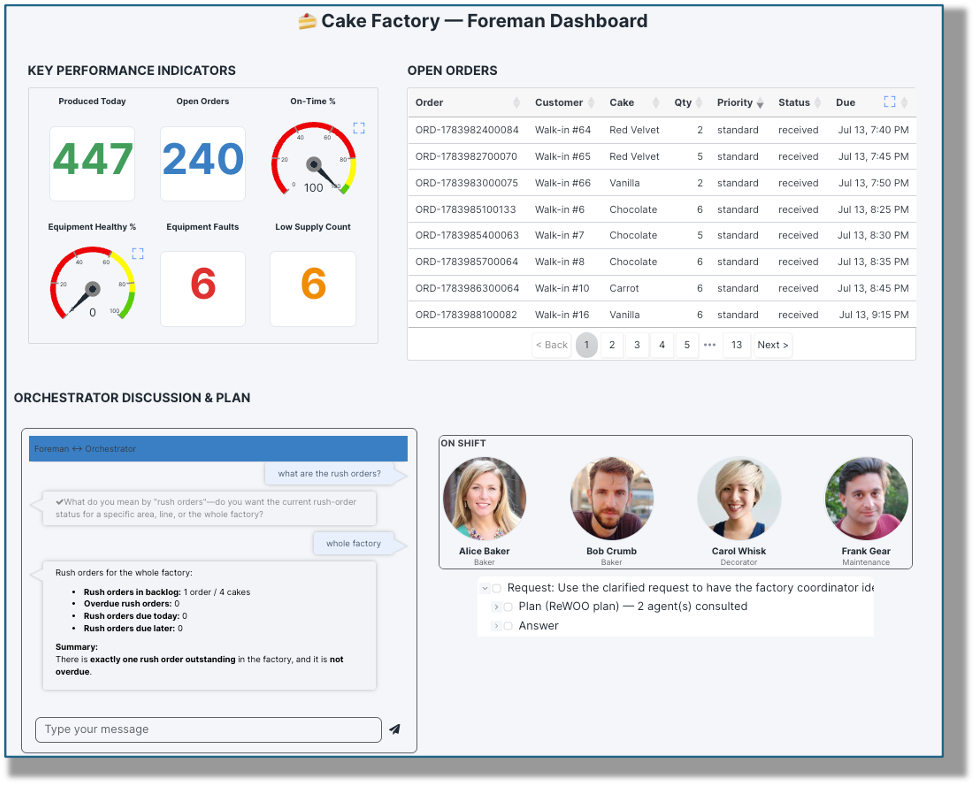
This project uses multiple agents to handle various aspects of an industrial bakery, from managing employee shifts to real-time equipment maintenance checks, to keeping stock of ingredients, etc. All of these agents are managed by a single ForemanOrchestrator agent, which uses a skill to determine the best agent(s) to involve in fulfilling given tasks from the “Foreman” user.
Building a MCP server for this project looks a bit different, then:
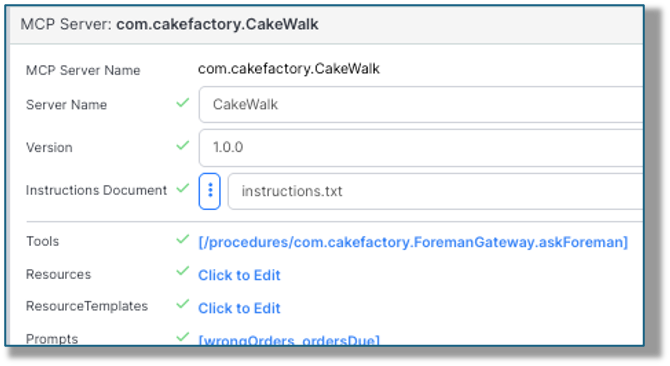
…and the main differences lie in the Tools and Prompts, so let’s focus on those two features.
Tools: Yes, these are VAIL procedures. In this case, remember I mentioned that the ForemanOrchestrator handled requests and figured out which other Agents to involve? The procedure askForeman in the MCP server is performing the same function that the Discussion Widget does from the dashboard – it sends the request in the proper Agent to Agent protocol format to the ForemanOrchestrator. This wrapper procedure is needed because the request has to come as an A2A protocol Message:
var message = io.vantiq.a2a.Message.forValue(request)

var task = io.vantiq.ai.A2A.messageSend("com.cakefactory.ForemanOrchestrator", message)
(In the dashboard, the DiscussionWidget handles this automatically.)
Once the request goes to the ForemanOrchestrator, this AI Agent will use its secret arts to send tasks to any other Agent(s) it deems relevant to resolving the request, consolidates the answer(s) and sends back the response.
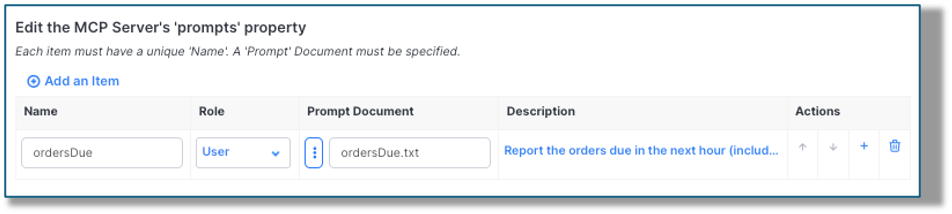
So, what’s the Prompt about? I’m getting there…
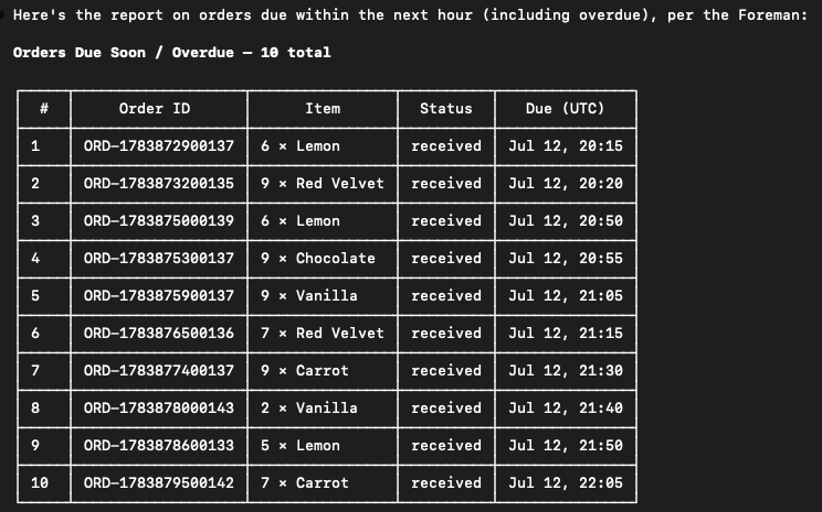
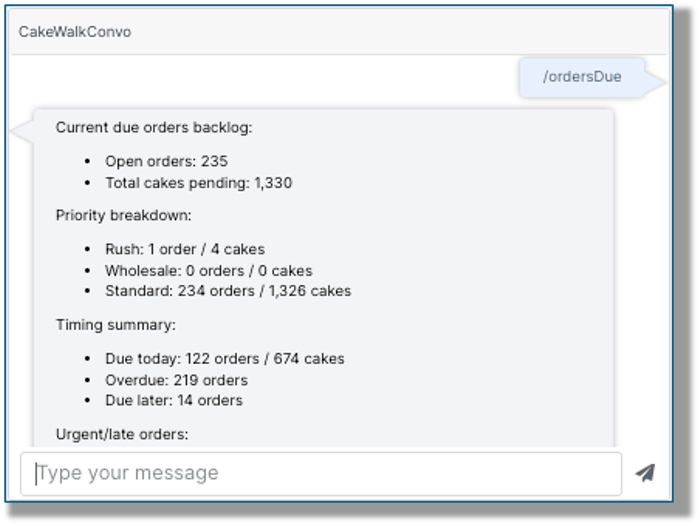
Prompts: These are documents with instructions for the AI; very handy for repeated requests, like our ordersDue prompt: Look up how many orders are supposed to be completed in the next hour, including any that are overdue, and give a report on each, along with their due times.
Access Token: “I don’t see that in the MCP server list.” Yes, but you’ll need a good access token to use the server, and we’d be remiss if we didn’t spend some time thinking about this. In the IDE, head over to Administer -> Advanced -> Access Tokens to create one for the MCP Server to use.
Click on the Profiles edit button to select the permissions level you’re comfortable with. In the case of the KB server, this was expandedUser_system, which allows for reads of the most common system types.
From Administer -> Advanced -> Profiles, you can both see exactly what privileges the existing profiles hold, or even make a custom one. Make sure it’s at the lowest-privilege level that will allow your MCP Server to function.
…which brings us to the CakeWalk server use case. In fulfilling tasks, the system writes to a type called com.cakefactory.CoordinationRun. Simple user profiles don’t allow writes to types, but we don’t necessarily want to grant full administrator privileges either. What to do?
There are a couple of options:
- Create a custom profile to allow writes to just the cakefactory.CoordinationRun type, then create an Access Token with that profile. (Probably the best solution)
- Allow users to make writes to the type from the type’s General tab:
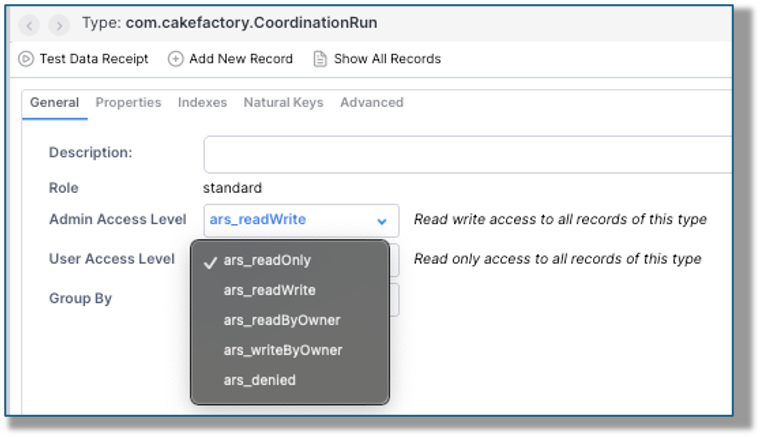
Either method will allow the fine-tuned privileges MCP server users will need to run the project’s server, without throwing open the gates to the namespace.
Ok, the pieces are all in place; how do we use our new MCP server? There are several ways; I’ll show two:
ClaudeCode:
I’ll fire up both the KB and CakeWalk servers, (along with the vantiqVIA server) by referencing them in the local .mcp.json file, then running Claude: (examples are from the CLI, but you do you!)
{
"mcpServers": {
  "vantiqVIA": {
    "type": "http",
    "url": "https://dev.vantiq.com/mcp/io.vantiq.via.mcpServer",
    "headers" : {
      "Authorization": "Bearer <Your project namespace full-access token>"
    }
  },
  "vantiqKB" : {
    "type" : "http",
    "url": "https://dev.vantiq.com/mcp/com.vantiq.KB.KB",
    "headers" : {
      "Authorization": "Bearer <Official KB Server token>"
    }
  },
  "cakeWalk" : {
    "type" : "http",
    "url": "https://dev.vantiq.com/mcp/com.cakefactory.CakeWalk",
    "headers" : {
      "Authorization": "Bearer <the lowest-priv token for this to work>"
    }
  }
 }
}
A quick check of /mcp shows that all three MCP servers are happy and healthy:

If I just type “/”, I’ll see a list of the prompts available, including the ordersDue prompt:
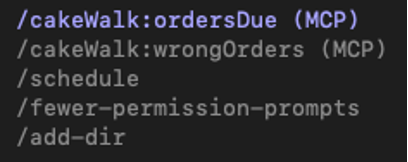
And choosing /cakeWalk:ordersDue yields the intended list of cakes either overdue or due in the next hour:
Or I can ask a developer question and get an answer from my KB server:
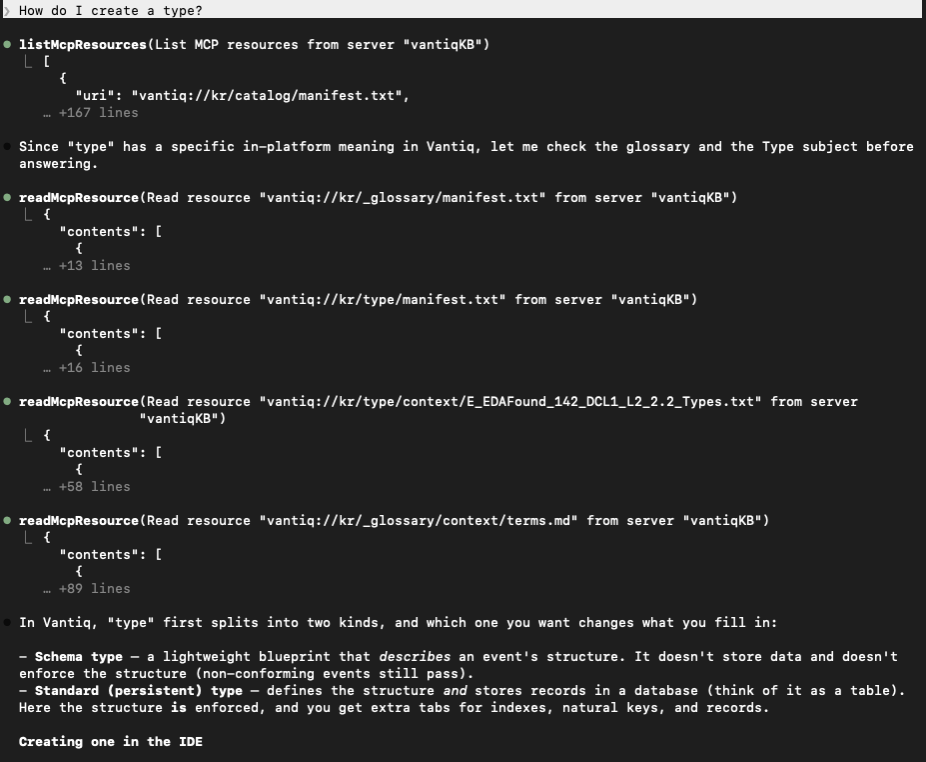
(This went on for a bit, but you get the picture.)
From the ClaudeCode CLI, we can ask a question, and the AI will determine which of the MCP Servers can find the relevant information; no action required from the requestor.
Vantiq Projects:
In Vantiq, projects can become MPC server clients using a GenAI procedure.
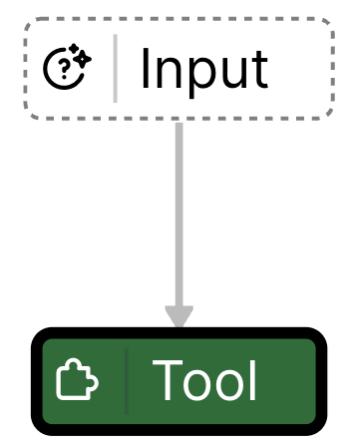
The Tool pattern’s mcpTools configuration accepts a JSON structure for the MCP Server. Here’s what the CakeWalk server structure looks like:
{
  "cakeWalk": {
    "url": "https://dev.vantiq.com/mcp/com.cakefactory.CakeWalk",
    "transport": "streamable_http",
    "headers": {
      "Authorization": "Bearer <the token supplied by the developer>"
     }
  }
}
In a Client, we can drag a simple Conversation widget to the canvas, and set the GenAI Procedure to interact with it. From here, we can ask questions about the cakes, personnel, equipment, etc. and even type in “/ordersDue” to use the prompt that was set up:
Conclusion:
MCP Servers aren’t AI in and of themselves; they’re a way to easily connect AI to the tools that want to use it. Creating a MCP Server in Vantiq is a simple matter of pointing to:
- operating instructions
- where the tools are, (that should be used directly)
- resource documents
- what special prompts are pre-arranged for convenience
Create an access token with the desired privileges to use project resources, and then the server can be used… everywhere MCP servers are used.
Having this ability to create a MCP server for AI projects is so handy, you’ll be making them often!
Attachments:
You must be
logged in to view attached files.


Developer How-To Series
Create and Use Your own MCP Server
July, 2026
A new and very useful feature in 1.44 is the ability to turn your Vantiq project into a MCP Server and make it available anywhere.
A quick history lesson: What made Stanley hinges so much more popular in the late 19th century than its competition? Answer: They were the first company to include the installation screws.
What made the Model Context Protocol (MCP) open-source standard, introduced by Anthropic in late 2024, so popular so fast? That’s easy; just like the Stanley screws of yore, MCP makes it easy to connect things. In this case, those “things” are AI systems to the data sources and tools that use them.
If there’s an application that uses AI, there’s a MCP server to plug it into your favorite LLM. As the MCP website puts it: “Think of MCP like a USB-C port for AI applications.”
And now you can create MCP servers out of your Vantiq projects.
In the IDE, you’ll find the option in the Add menu. Choose Add -> MCP Server…:
And now we’ll move on to concrete examples so you can see what all the features are for.
Use Case #1: The Knowledge Base (KB) MCP Server
This server is available to all developers who want to ask more probing questions about the whys and wherefores to building Vantiq applications. To answer your questions, this server is instructed to search through its vast collection source documents to find the relevant material. Those instructions are in the kr/mcp-instructions.md file, and referenced in the Instructions Document setting for the server:
The file tells the AI what to do and how to do it.
Notice we’ve also supplied the MCP Server Name (that’s the name of the resource on the platform) and the Server Name (that’s its nickname, if you will). Fill in what makes sense for your server’s version – it’s handy to know the version in case someone need to update for the latest-greatest.)
For this server, the Tools and Prompts are not important, but the Resources and ResourceTemplates are, so let’s cover those first.
Resources: These are reference documents to aid the server in its mission. Here’s what the KB resources look like. Each has a Name field, the URL to the document, and a Title, along with a description:

Notice we’re not supplying every document the server will search, but only the ones that cover a broad category and point to other docs with the specifics. (Of course, the instructions patiently explain what to do with them.)
ResourceTemplates: The source documents follow a consistent pattern, so why waste time with all the extra words? Here’s the template for “subject-context”: kr/{resource}/context/{+filename}
The values for resource and filename get filled in at run-time with the pertinent information, turning this dynamic URI into the exact location of the needed content.
Use Case #2: The CakeWalk MCP Server
This project uses multiple agents to handle various aspects of an industrial bakery, from managing employee shifts to real-time equipment maintenance checks, to keeping stock of ingredients, etc. All of these agents are managed by a single ForemanOrchestrator agent, which uses a skill to determine the best agent(s) to involve in fulfilling given tasks from the “Foreman” user.
Building a MCP server for this project looks a bit different, then:
…and the main differences lie in the Tools and Prompts, so let’s focus on those two features.
Tools: Yes, these are VAIL procedures. In this case, remember I mentioned that the ForemanOrchestrator handled requests and figured out which other Agents to involve? The procedure askForeman in the MCP server is performing the same function that the Discussion Widget does from the dashboard – it sends the request in the proper Agent to Agent protocol format to the ForemanOrchestrator. This wrapper procedure is needed because the request has to come as an A2A protocol Message:
var message = io.vantiq.a2a.Message.forValue(request) var task = io.vantiq.ai.A2A.messageSend("com.cakefactory.ForemanOrchestrator", message)(In the dashboard, the DiscussionWidget handles this automatically.)
Once the request goes to the ForemanOrchestrator, this AI Agent will use its secret arts to send tasks to any other Agent(s) it deems relevant to resolving the request, consolidates the answer(s) and sends back the response.
So, what’s the Prompt about? I’m getting there…
Prompts: These are documents with instructions for the AI; very handy for repeated requests, like our ordersDue prompt: Look up how many orders are supposed to be completed in the next hour, including any that are overdue, and give a report on each, along with their due times.
Access Token: “I don’t see that in the MCP server list.” Yes, but you’ll need a good access token to use the server, and we’d be remiss if we didn’t spend some time thinking about this. In the IDE, head over to Administer -> Advanced -> Access Tokens to create one for the MCP Server to use.
Click on the Profiles edit button to select the permissions level you’re comfortable with. In the case of the KB server, this was expandedUser_system, which allows for reads of the most common system types.
From Administer -> Advanced -> Profiles, you can both see exactly what privileges the existing profiles hold, or even make a custom one. Make sure it’s at the lowest-privilege level that will allow your MCP Server to function.
…which brings us to the CakeWalk server use case. In fulfilling tasks, the system writes to a type called com.cakefactory.CoordinationRun. Simple user profiles don’t allow writes to types, but we don’t necessarily want to grant full administrator privileges either. What to do?
There are a couple of options:
Either method will allow the fine-tuned privileges MCP server users will need to run the project’s server, without throwing open the gates to the namespace.
Ok, the pieces are all in place; how do we use our new MCP server? There are several ways; I’ll show two:
ClaudeCode:
I’ll fire up both the KB and CakeWalk servers, (along with the vantiqVIA server) by referencing them in the local .mcp.json file, then running Claude: (examples are from the CLI, but you do you!)
{ "mcpServers": { "vantiqVIA": { "type": "http", "url": "https://dev.vantiq.com/mcp/io.vantiq.via.mcpServer", "headers" : { "Authorization": "Bearer <Your project namespace full-access token>" } }, "vantiqKB" : { "type" : "http", "url": "https://dev.vantiq.com/mcp/com.vantiq.KB.KB", "headers" : { "Authorization": "Bearer <Official KB Server token>" } }, "cakeWalk" : { "type" : "http", "url": "https://dev.vantiq.com/mcp/com.cakefactory.CakeWalk", "headers" : { "Authorization": "Bearer <the lowest-priv token for this to work>" } } } }A quick check of /mcp shows that all three MCP servers are happy and healthy:
If I just type “/”, I’ll see a list of the prompts available, including the ordersDue prompt:
And choosing /cakeWalk:ordersDue yields the intended list of cakes either overdue or due in the next hour:
Or I can ask a developer question and get an answer from my KB server:
(This went on for a bit, but you get the picture.)
From the ClaudeCode CLI, we can ask a question, and the AI will determine which of the MCP Servers can find the relevant information; no action required from the requestor.
Vantiq Projects:
In Vantiq, projects can become MPC server clients using a GenAI procedure.
The Tool pattern’s mcpTools configuration accepts a JSON structure for the MCP Server. Here’s what the CakeWalk server structure looks like:
{ "cakeWalk": { "url": "https://dev.vantiq.com/mcp/com.cakefactory.CakeWalk", "transport": "streamable_http", "headers": { "Authorization": "Bearer <the token supplied by the developer>" } } }In a Client, we can drag a simple Conversation widget to the canvas, and set the GenAI Procedure to interact with it. From here, we can ask questions about the cakes, personnel, equipment, etc. and even type in “/ordersDue” to use the prompt that was set up:
Conclusion:
MCP Servers aren’t AI in and of themselves; they’re a way to easily connect AI to the tools that want to use it. Creating a MCP Server in Vantiq is a simple matter of pointing to:
Create an access token with the desired privileges to use project resources, and then the server can be used… everywhere MCP servers are used.
Having this ability to create a MCP server for AI projects is so handy, you’ll be making them often!
Attachments:
You must be logged in to view attached files.